Not Just A Chatbot

Ori has a body, not just a chat window

Most AI assistants live in a sidebar, waiting to be asked. Ori lives inside the product itself, present on screen, aware of what you're looking at, and able to act directly in the environment instead of just describing what to do. It's the same assistant across every system we build: ask Ori anything from the Workspace, and it's the client-facing research assistant inside our market research solutions, reading each account's own reports and profiles.

Observer Assistant Advisor Executive Partner

Ori, the Orivus AI assistant, rendered as a glowing violet orb character
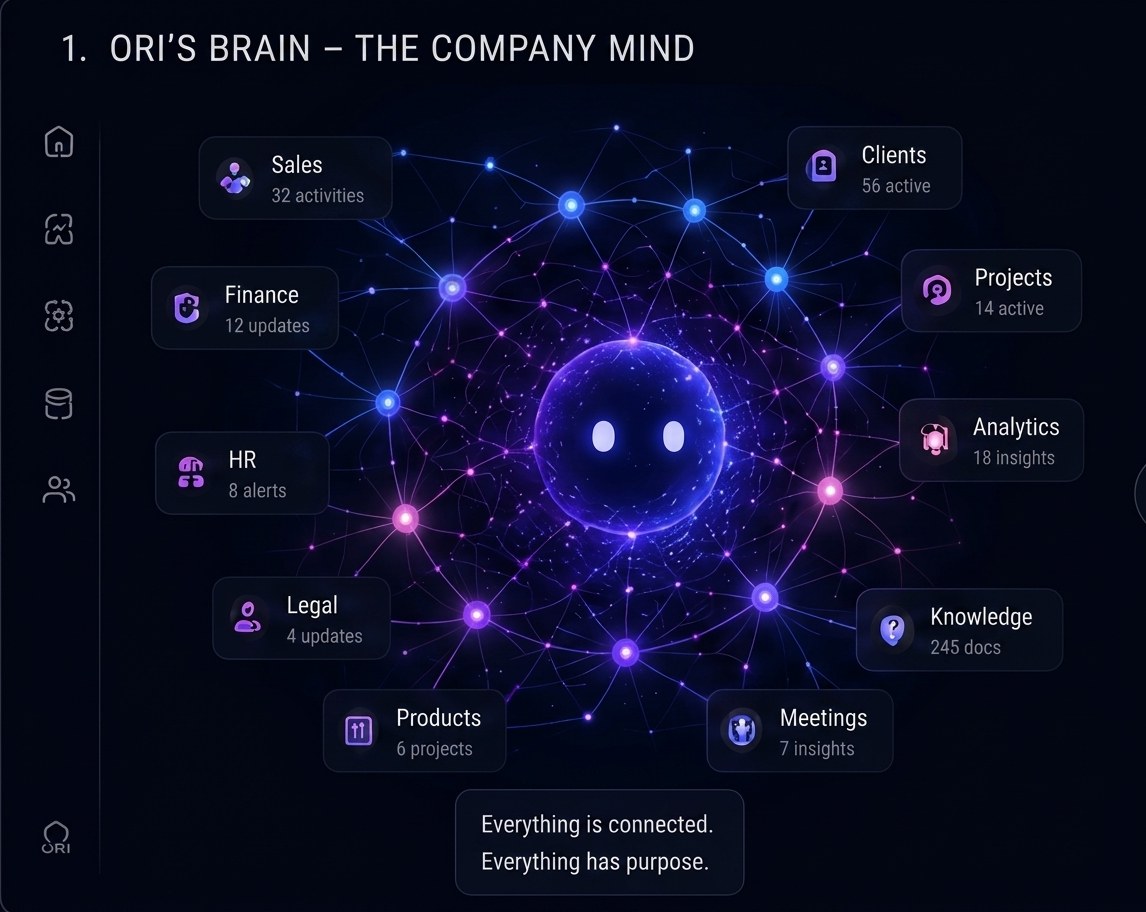
Ori's Brain

Everything connected, everything with purpose

Ori isn't bolted onto one dashboard. It's wired into sales, clients, finance, operations, people, legal, products, and every meeting in between, so what it tells you is never a guess.

  • Notices what's changed

    Ori tracks the same data your team does, so it can flag a shift the moment it happens, not after someone finds it in a report.

  • Points things out, in context

    Instead of a generic alert, Ori highlights the exact metric, project, or record it's referring to, right where you're already looking.

  • Moves things for you

    Reschedule a meeting, reorder a board, reassign a task Ori can carry out the action directly inside the Workspace on your behalf.

  • Runs alongside meetings and timelines

    From a live meeting transcript to a project timeline or a full incident "war room," Ori stays present through the whole workflow, not just at the start.

Diagram of Ori's brain connected to Sales, Clients, Finance, Operations, HR, Legal, Products, Meetings, Analytics, and Knowledge
Ori's Own Space

Open Ori and it already knows what today looks like

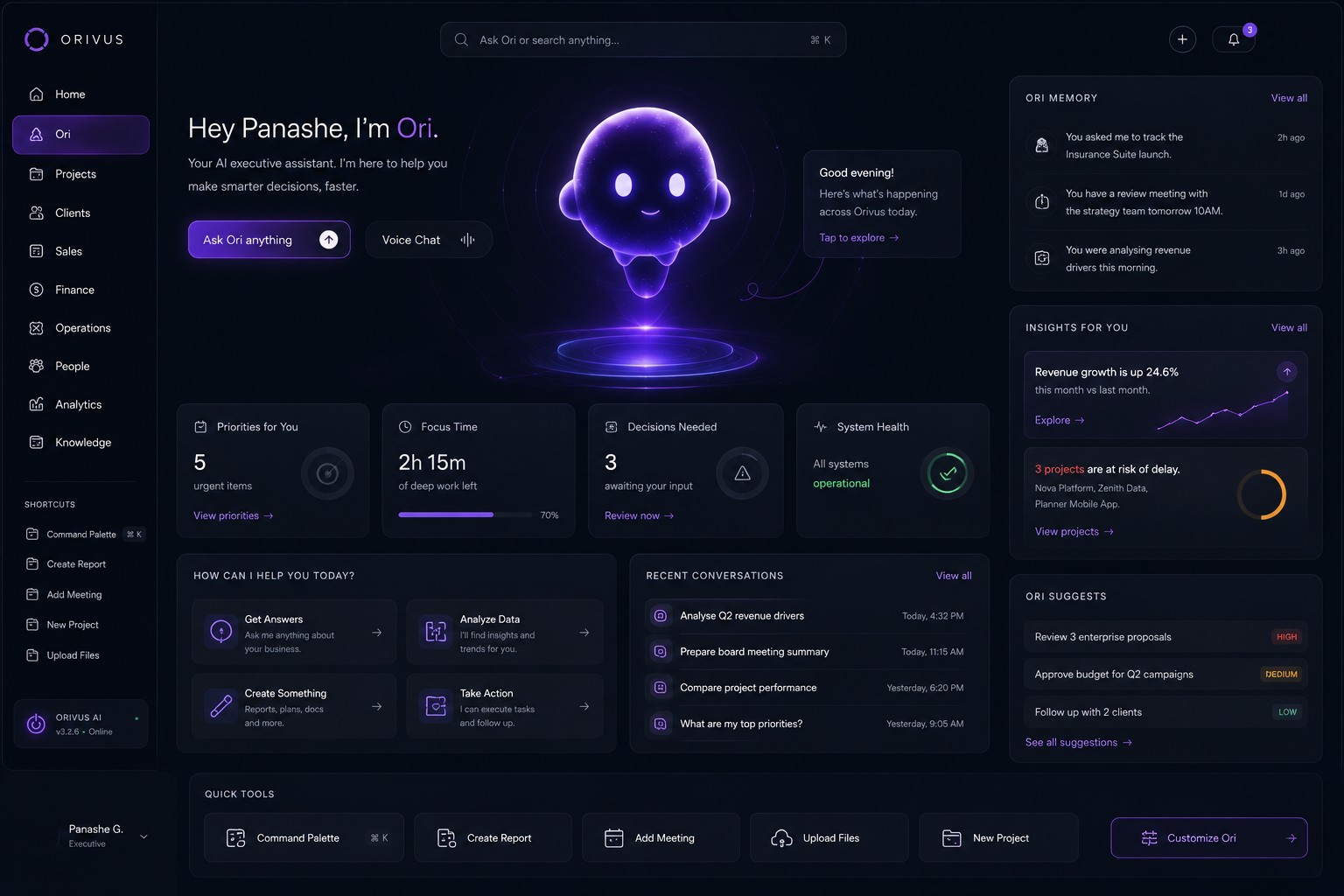
Ori isn't just a panel that follows you around the Workspace, it also has its own home screen: a full briefing the moment you open it, built from real Workspace data, not a blank prompt waiting for the first question.

Ori's home screen inside Orivus Workspace, showing Priorities for You, Focus Time, Decisions Needed, System Health, quick-action tiles, Recent Conversations, Ori Memory, Insights For You, and Ori Suggests
First Thing You See

Priorities, focus time, decisions, system health

Five urgent items, the deep-work hours actually left in the day, the decisions sitting in your queue, and a system-health check, all before a single word gets typed. Four starting points, Get Answers, Analyze Data, Create Something, Take Action, replace the blank prompt entirely.

Recent Conversations

Past questions, "Analyse Q2 revenue drivers," "What are my top priorities?" stay one click away, so nothing gets asked twice.

Ori Memory

Ori remembers what you asked it to track, the meetings you have coming up, and the analysis you were mid-way through, across sessions.

Insights & Suggestions

Revenue trends and at-risk projects surface as insights; reviewing proposals or following up with a client shows up as a suggestion, ranked by priority.

Type it or say it with Voice Chat, and Quick Tools, Command Palette, Create Report, Add Meeting, Upload Files, New Project, sit one tap away for whatever comes next.

See It In Every Context

From company mind to executive partner

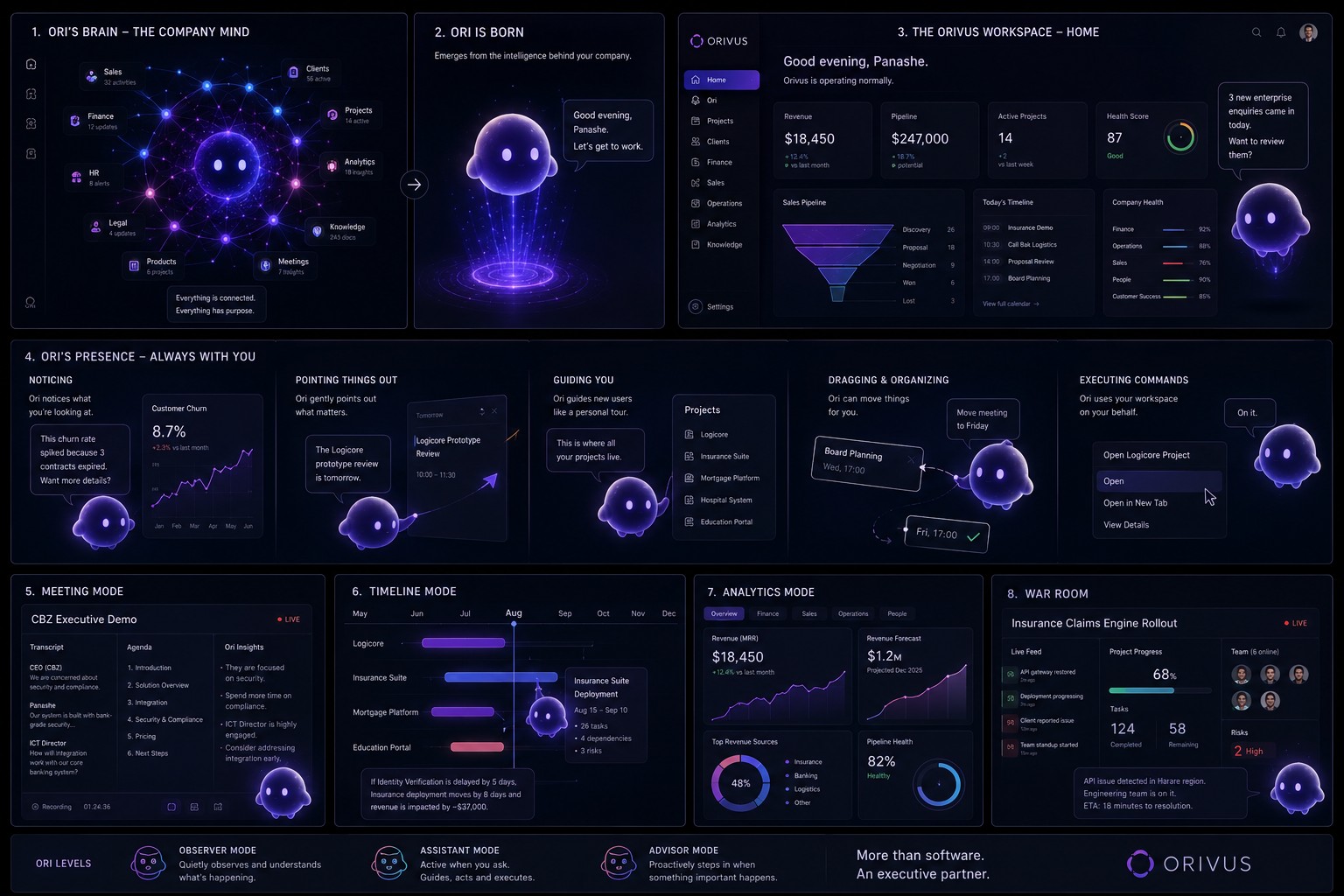
Ori is born from the intelligence behind your company, then shows up everywhere that intelligence is needed: on the home screen, inside a live meeting, on a project timeline, in analytics, and in the war room when something's on fire.

Ori's brain diagram, Ori being born, the Orivus Workspace home screen, Ori noticing and pointing things out, meeting mode, timeline mode, analytics mode, and a live incident war room, with Observer, Assistant, and Advisor modes shown at the bottom
1

Ori's Brain

Connected to every department, so nothing it says is a guess.

2

Ori Is Born

Emerges from that intelligence, ready to work.

3

Workspace Home

The full company briefing, one screen.

4

Ori's Presence

Noticing, pointing things out, guiding, and executing commands, right where you're working.

5

Meeting Mode

Live transcript, agenda, and insights as the conversation happens.

6

Timeline Mode

Dependencies and risk mapped across every active project.

7

Analytics Mode

Revenue, pipeline health, and top sources, explained, not just charted.

8

War Room

Live incident tracking with the team, tasks, and risks in one place.

Observer, Assistant, Advisor, Executive Partner. Ori scales its involvement to what the moment calls for.

See It In Action

Bring Ori into your business

Ori ships as part of Orivus Workspace. Tell us about your team and we'll walk you through it.